ALLIED TELESYN AT-AR236E

- Ketikkan di Address Bar : 192.168.1.1

- Masukkan username : manager dan password : friend, lalu klik Log In..

- ALLIED TELESYN AT-AR236E’s Home

ALLIED TELESYN AT-AR236E


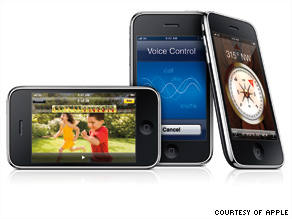 The iPhone 3GS is already wooing game developers with its faster, more powerful platform, but don't expect a ton of games fully taking advantage of it to flood the App Store -- yet.
 Game developers aren't hurrying to create games specifically for the new iPhone 3GS.
Though 1 million iPhone 3GSs sold in one weekend, the latest Apple mobile device is essentially still a niche product, compared to the 40 million original iPhones, iPhone 3Gs, and both iPod Touch models already sold. And those won't be able to run games with the same efficiency and speed as the new iPhone 3GS.
In short, it's still too early to declare the era of iPhone 3GS games officially arrived.
Some game makers are waiting, or not creating games to take advantage of the device at all. Some say it's "not wise" to play specifically to what is still a small slice of the audience combing Apple's App Store for the latest downloads.
For example, Pop Cap, the company behind Peggle and Bejeweled for the iPhone, said its games are benefiting from the faster load times the 3GS offers, but it has no plans to create games that are iPhone 3GS-specific.
This wait-and-see approach may be contrary to what some expected. The iPhone 3GS was essentially an update to the iPhone 3G. The "S," we were told, stands for "speed." Indeed, there's a faster processor, a PowerVR SGX graphics chip that can handle 3D rendering, and support for OpenGL ES 2.0, a standard use for creating 2D and 3D graphics. It also has a magnetometer and a video camera, unlike other Apple mobile devices.
At the device's world premiere at Apple's Worldwide Developers Conference earlier this month, Apple marketing chief Phil Schiller promised that games on the iPhone 3GS would perform better, and, in the parade of developers brought up on stage to demonstrate apps for the new device, the only category among education, health, games, books, and music to be repeated were games.
Pop Cap will continue to make casual games, not graphics-intensive action games, despite the opportunity the iPhone 3GS offers, according to Andrew Stein, the company's director of business development.
"Our philosophy is not to take advantage of technology just because it's there," he said. "The other thing to keep in mind: Apple has sold 1 million 3GSs, but there are 40 million devices already in market. By focusing specifically on 3GS, you're leaving a huge potential market untapped at that point," said Stein.
Independent developer Kuan Yong is already hard at work on updating his AirCoaster 3D game, which has sold 100,000 copies since February on the App Store. AirCoaster is a 3D roller-coaster simulator. For earlier iPhone and iPod Touch models, it uses the accelerometer to allow the player to gain momentum on the roller-coaster track. But now, with the iPhone 3GS's magnetometer inside, the phone can be moved along vertical and horizontal axes to tilt view, like a compass.
Yong has already demonstrated it works, using the updated iPhone software development kit, and posting a video to the Web (see below). But he's not in a screaming hurry to get it onto the App Store.
"Not (every user) has upgraded, so it makes sense for us to wait a little while," he said. "You can create a 3GS-only app, but it's not a good idea if there's only 1 million out there."
So even though the iPhone 3GS has been on the market for a little over a week, and while developers are clearly eager to see what the new device can offer for games (many of the people we met in line the first day were independent game creators) the flowering of super-powerful, intense 3D graphics won't take place until more devices capable of running them are on the market.
While iPhone 3GS sales will certainly pick up, if previous iPhone model sales are any indication, the device that will blow open this market for game makers isn't an iPhone.
It's an updated iPod Touch, and going by Apple's previous development cycles, a new model will be coming later this year, likely in September. Last week we got a hint the date might be getting close when someone poking around in the iPhone OS 3.0 firmware spotted a reference to "iPod3,1."
Given that the current generation is referred to as "iPod2,1," it's not hard to see where this is going: after every iPhone release there's been an iPod Touch with similar features--with the exception of the hardware related to the phone--released a few months later.
As popular as the iPhone is, the iPod Touch is infinitely cheaper over the course of the device's lifetime since there's no expensive 2-year wireless service plan to be tied to. That makes the device much more accessible for a wider audience. That, in turn, will be a huge boon to companies looking to make more power games that take advantage of OpenGL 2.0 and the magnetometer.
AirCoaster creator Yong thinks that Apple will spend more time advertising the platform's capability in regard to games at that point, too. "We'll see Apple make a big push with developers," he thinks.
And for many developers, that can't come quickly enough. Gameloft, the French video game publishing company behind iPhone games like Real Soccer 2009, and Hero of Sparta, is chomping at the bit to develop games that "push the limits" of the platform, according to CEO Michel Guillemot.
"We're going to leverage on that to create even better games in the highly demanding action games category," he said in an interview. "We are delighted to have the possibility to have much better graphics and much better frames per second rate." That's still a few months away, however.
 Mozilla released its latest version of Firefox, the world’s second-most-popular Web browser, on Tuesday. Available for Windows, Mac OS X and Linux in more than 70 languages, Firefox 3.5 is the browser’s first major upgrade since the launch of Firefox 3 in June 2008.
 including a private browsing mode, customized downloadable fonts, the ability to show video built into Web pages without plug-ins, and geolocation technology that lets Web sites know where you are.
Early reviews have been positive. Slate’s Farhad Manjoo tested a pre-release version and found it “hard to beat.” An excerpt:
Though I can’t call it the world’s fastest browser—Chrome and Safari are just as fast—the new Firefox is no longer a lumbering beast. It launches quickly, fires up complex sites like Gmail and Google Maps without any hiccups, and runs tons of open tabs without crashing (an ever-present possibility in earlier versions).
And ComputerWorld’s Preston Gralla says:
The just-released version 3.5 of Firefox is a winner, offering significantly faster Web browsing, better tab handling, a host of interface tweaks and, like just about every other browser on the planet, a “porn mode.” If you already use Firefox you’ll want to upgrade right away. If you’re not a Firefox user, this version represents a very good opportunity to give the browser a test run.
In his review, CNET’s Seth Rosenblatt is a little more cautious in his praise:
It is by no means the leap ahead that its predecessor Firefox 3 was, and it’s clear that the competition isn’t going away anytime soon.
How about you new Firefox 3.5 users out there? Anyone want to weigh in?

Untuk mengantisipasinya, terdapat beberapa tip yang bisa Anda gunakan agar Blackberry Anda lebih tahan lama:
1. Matikan beberapa fitur yang tidak digunakan seperti wifi dan bluetooth.
2. Tingkat keterangan layar bisa diatur ke tingkat yang paling rendah.
3. Pengaturan backlight time out secepat mungkin.
4. Ketika handheld tidak digunakan, ada baiknya aktifkan standby mode.
5. Pilih salah satu network saja sebagai 'jalan' untuk Blackberry beroperasi (bisa 3G atau 2G saja). Jika berada di wilayah yang tidak terdapat sinyal jaringan, jangan ambil resiko. Matikan saja Blackberry Anda karena secara otomatis perangkat Anda akan melakukan pencarian sinyal. Hal inilah yang semakin menyedot banyak tenaga baterai.
6. Penggunaan nada dering memang sangat menarik. Namun adakalanya nada dering digunakan bersamaan dengan fitur getar. Penggunaan keduanya disinyalir membutuhkan daya baterai yang cukup besar. Oleh karena itu, ada baiknya jika Anda menggunakan satu fitur saja, nada dering atau getar saja.
7. Jika Anda sudah menggunakan ringtone atau nada getar saja, penggunaan LED indicator sepertinya tidak terlalu berpengaruh di Blackberry. Oleh karena itu, jika LED indicator diposisikan dalam keadaan off maka proses ini dapat membuat baterai lebih irit.
8. Ada baiknya jika Anda mengatur email dan sms yang masuk ke dalam perangkat. Diprediksi, kuantitas akses informasi yang masuk ke Blackberry akan mempengaruhi daya tahan baterai. Semakin banyak email/sms yang masuk maka semakin cepat baterai Blackberry tersebut mengalami low.
9. Setel perangkat BlackBerry Anda untuk hidup dan mati secara otomatis.
10. Jagalah kebersihan sambungan baterai. Setiap beberapa bulan, gunakan pembersih telinga atau kain kering untuk membersihkan kontak logam pada baterai dan perangkat.
11. Hapus pesan asli bila Anda mengirim balasan.
12. Kirim pesan ke beberapa kontak sekaligus menggunakan Tambah Ke, Tambah Cc, atau Tambah Bcc.
13. Matikan lampu kilat (flash) di kamera.
14. Tutuplah aplikasi pihak ketiga dari menu aplikasi bila Anda selesai menggunakannya.
15. Ubah opsi browser Anda untuk grafik animasi agar tidak sering diulang pada halaman web.


 Microsoft, sang raksasa software di dunia memang tidak sedang main-main ketika meluncurkan ide untuk membuat sebuah program antivirus gratis karena pada minggu depan program antivirus gratis dari Microsoft itu akan memasuki tahap pengujian Beta untuk publik.
 Browsing Internet dengan kecepatan yang tinggi pasti sangat menyenangkan, berbagai cara dilakukan untuk mempercepat koneksi internet baik menggunakan software agar koneksi internet menjadi lebih cepat maupun menggunakan settingan tertentu yang diklaim bisa mempercepat koneksi internet.


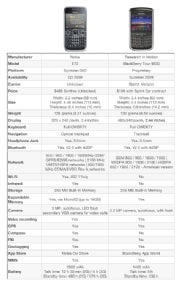
Two new business-oriented smart phones are about to the hit store shelves: The latest in Nokia's line of business phones, the E72, and the long-rumoured BlackBerry Tour 9630.
Both phones will be on the market later on this year, with the BlackBerry 9630 available this summer on Sprint and Verizon, while the Nokia E72 will be available in the third quarter. Here's a head-to head comparison of these brand new business phones.
And read on for an outline of the main pros and cons of the BlackBerry Tour 9630 and the E72.
In terms of appearance, the E72 and the Tour 9630 look quite similar. The BlackBrry Tour 9630 is slightly wider and thicker than the metal-encased E72, and both phones weigh just over 4.5 ounces.
Both business smart phones feature a 2.4-inch display, but the BlackBerry Tour is the hands-down winner in this category, with a brighter and crisper display, packing more pixels per inch than the E72 (see chart for resolutions).
The Tour 9630 features the now famous BlackBerry QWERTY keyboard, but Nokia is also catching up in this department; the E72 has a roomy keyboard inherited from the previous model, the E71.
When it comes to navigating the devie, the BlackBerry uses the trackball found on previous models. But the E72 brings something new to the table: an optical trackpad, which, judging by this demonstration video, looks easy to use. For a new user, either navigation solution will take some getting used to, so this comes down to personal preference.
As for connectivity, the Nokia E72 looks like a good all-rounder, with Wi-Fi, Bluetooth, and an Infrared port. The BlackBerry Tour features Bluetooth as well, (with A2DP) but is somehow lacking Wi-Fi (just like the much-derided BlackBerry Storm). My colleague Ginny Mies talks more about this here. The E72 also features an FM radio, which the Tour doesn't.
The camera is yet another major differentiation point between the E71 and the Tour. The Nokia device features a 5-megapixel camera and a secondary camera for video calls, while the BlackBerry Tour has a 3.2-megapixel camera. Both cameras have autofocus, flash, and video recording capabilities.
Both the E72 and the Tour 9630 feature built-in GPS, which is used for navigation and for geotagging pictures taken with the phones. However, Nokia added to the E72 an electronic compass, for an improved navigation experience.
Lastly, both devices come with an application store: Nokia has its brand-new Ovi Store while Research in Motion launched the BlackBerry App World a few months ago. Both app stores are relatively young, but are offering more new and useful apps regularly, so I would call a tie in this department.
Of course, this is just a rundown through the devices based on the specifications released by the manufacturers so far. When both devices become available, we will put them through some extensive tests and report back to you as usual.
Follow Daniel on Twitter @danielionescu

Nokia on Monday unveiled the E72, the successor to its popular E71 business handset.
The updated version of Nokia's QWERTY-keyboarded candybar phone includes an optical navigation key. According to Nokia vice president Ilari Nurmi, the new input method allows for "more intuitive scrolling through menus, e-mails and fast panning of images."
Another enhancement visible on the front of the Series 60 phone is the ability to turn the handset into a flashlight with a single press of the space bar key.
The E72's camera is a 5-megapixel affair, while the E71 only had a 3.2-megapixel camera. The device also appears to have a new speaker at the back of the phone.
Nokia says the E72 uses active noise cancellation to make calls clearer. The handset also has a 3.5mm headphone jack -- unlike its predecessor -- so standard headphones can be used without an adapter.
In terms of its dimensions, the E72 is almost identical to the E71 -- it is the same height and thickness, but is 1mm wider and a gram heavier.
The E72's 3G data connectivity specifications are superior to those of the E71, which has 3.6Mbps HSDPA. The updated handset takes that downlink speed to 10.2Mbps, and also has HSUPA uplink speeds of up to 2Mbps.
A new version of the QuickOffice productivity suite is included, offering compatibility with Microsoft Office 2007 formats. Preinstalled e-mail clients include Mail for Exchange and IBM Lotus Notes Traveller.
The E72 will go on sale at the end of the third quarter for 350 euros before tax and operator subsidies.
 Blackberry Tour’s display is simply incredible. At 480×360 web browsing is awesome and pictures and videos are amazingly crisp and clear. There is a 3.2MP camera, 256MB of memory and international roaming capabilities. With the support of EVDO Rev A, quad-band EDGE and 2100 MHz HSPA/UMTS you can take the BlackBerry Tour smartphone pretty much anywhere in the world and be able to stay in touch.
 Research In Motion Ltd. Tuesday unveiled the BlackBerry Tour smart phone for Verizon Wireless and Sprint Nextel Corp., breaking its pattern of releasing devices with an exclusive wireless carrier partner. The device, which will be available later this summer is able to tap faster 3G networks in the U.S and around the world, will give Verizon Wireless and Sprint a high-end business phone. At $199 after rebates, it is priced at the same level as the new Palm Inc. Pre and Apple Inc. iPhone 3G S.
A quick look at the Blackberry Tour 9630 for Sprint. Credit: Mobileburn
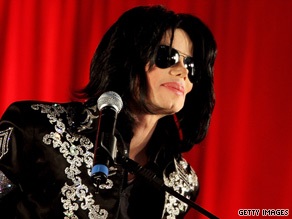
The "King of Pop," who was preparing for a comeback tour, died Thursday at age 50.
Jackson, under apparent cardiac arrest, was taken from his home by paramedics to Ronald Reagan UCLA Medical Center, where a team of physicians tried to resuscitate him for more than an hour, said Jackson's brother Jermaine. He said the music idol was pronounced dead at 2:26 p.m. (5:26 p.m. ET).
Another one of Jackson's six siblings told CNN that he learned of Jackson's death through his manager, Frank Dileo.
At the hospital, security guards blocked every entrance to the emergency room. Even hospital staffers were not permitted to enter. A few people stood inside the waiting area, some of them crying.
At one point, three tow trucks arrived at the residence and a silver BMW with Texas license plates was later removed. No reason was given by police.
During a career that began at age 5 singing with his brothers, Jackson had numerous No. 1 hits. "Thriller" is the best-selling album of all time, at an estimated 50 million copies worldwide.
But after dominating the popular music scene for years, Jackson became reclusive and mired in scandals that include molestation charges. He was acquitted after a well-publicized trial in Santa Maria, California, in March 2006.
Last year, Jackson announced a comeback tour that was to start in July. When some of the shows were postponed till next year, rumors spread that the entertainer was weak and suffering from skin cancer.
However, Marlon Jackson said he last saw his younger brother at a May 14 family gathering and he "looked great."
"He was looking well. He was getting ready to go into rehearsals for his tour. I don't know what happened," Marlon Jackson said.
"Janet Jackson is grief-stricken and devastated at the sudden loss of her brother," said her manager, Kenneth Crear. "She is ... flying immediately to California to be with her family."
A large crowd gathered outside the hospital, according to video footage. Michael Jackson fans across the world reacted with sadness.
Some, including actress Elizabeth Taylor and musician Stevie Wonder, were too distraught to issue statements.
Producer Quincy Jones, who helped Jackson craft his hit albums "Off the Wall" and "Thriller," said, "I am absolutely devastated at this tragic and unexpected news."
"For Michael to be taken away from us so suddenly at such a young age, I just don't have the words," Jones added in a statement.
Jackson's music continues to be heard throughout the world "because he had it all -- talent, grace, professionalism and dedication," Jones said. He called Jackson a consummate entertainer, whose legacy will be felt around the world.
"I've lost my little brother today and part of my soul has gone with him," Jones said.
Berry Gordy, producer and founder of Motown Records, said Jackson's death was "like a bad dream."
"As a kid, Michael was always beyond his years. He was an innovator. He was a genius at what he did," Gordy said. "He had a knowingness about him. At 9 years old, when I first started working with him, he seemed to me like he had been here before. He was just so knowledgeable about life."
Lisa Marie Presley, Jackson's former wife, said she was "shocked and saddened" by his death.
"My heart goes out to his children and his family," she said.

During the past few months, hundreds of thousands of software developers and other digerati have been beta-testing the upgrade and broadcasting its assorted charms. As the iPhone has evolved into a full-fledged pocket computer, with more than 50,000 applications, it has become a bit more cumbersome to use. I've got more than 120 apps, for instance, stacked 20 to a screen, that I have to arrange or alphabetize by hand. The upgrade addresses that problem by creating a universal search function that can scour all applications; many users are making this their home screen so they can instantly find the applications (or contacts) they want.
With the upgrade, iPhone users will finally catch up with BlackBerry users, who have always been able to search their messages and sort them by a variety of criteria. That said, the new search function will not scan the body of messages — just subject and sender data. But that alone will doubtless make the iPhone more appealing to business people and other e-mail-intensive users.Here are a few other reasons that this upgrade is significant:
Application alerts. The iPhone's main limitation prior to this upgrade was that it could typically run only one application at a time. Now, an application can contact you even if it's not running, meaning you don't need to be using, say, an instant-message app to be alerted that you received a message. This fix, which lets apps alert users via text messages, also means that all those cool-sounding social-network apps that let you know when a pal is nearby will finally work. In geekspeak, this alert system is known as "push notification," and it's something software developers have long wanted. The ways this feature will be used are endless, and useful.
Multimedia messaging. Users can now send photos, vCards — that is, contact info — and, with the upcoming 3GS, video the same way they send text messages. One nice upside is that this enables users to send rich media to friends who don't have e-mail on their phones.
Third-party hardware support. Apple is extending the iPhone platform to hardware makers so that they can attach all manner of things — from glucose and heart monitors to GPS mounts that plug your phone into your car's stereo.
3G tethering. Use your iPhone like a wireless modem and connect a laptop to it. Never pay for wi-fi at a hotel again! At least, that's the promise of this technology. In reality, we have no idea what U.S. cellular partner AT&T will charge users; AT&T hasn't even said yet when it will open its network to this feature.
In-app subscriptions and parental controls. As a magazine guy, I couldn't resist this one. While this feature will mainly be used by game developers — buy the game and pay for new levels, for instance — it'll be a boon to the periodicals business too. We could, theoretically, develop a TIME magazine app and sell subscriptions. And with parental controls, Apple is clearly getting out of the censorship business, putting those decisions in the hands of users.
Of course, some of the new operating system's power will be realized only on the 3GS, which promises to be faster and have a greater variety of bells and whistles (a compass, so that you can see what direction you're facing; a video camera and a 3-megapixel camera) that are missing on the current version. For Apple fans, the only thing that would make this week more exciting would be if Steve Jobs, who's been out on sick leave and is due back by the end of June, finally returned.
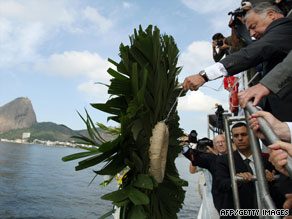 PARIS, France (CNN) -- Air France will pay families about €17,500 ($24,500) in initial compensation for each victim of the crash of Flight 447 this month, the company's chief executive says.
So far, Air France has been in touch with about 1,800 relatives of the people who died when the Airbus A330 crashed into the Atlantic Ocean on June 1, chief executive Paul-Henri Gourgeon told France's RTL radio Friday.
The company is also providing families with counseling, he said.
"Of course, this is not always easy, (but) we make up for it," he said. "We have psychologists in each country, in each stop. You know that the passengers were of 32 different nationalities, so all that is of great complexity, but we have the ability to manage this complexity. It's just a question of means and no limits on the means that we put in place."
Gourgeon said it has been difficult tracing the relatives of all 228 victims.
"The modern world is different and we often have only a cell phone, and as you can imagine, this cell phone is unfortunately in the aircraft," he said. "So we probably put more hours to access all the relatives."
With no wreckage and few clues about what caused the plane to go down, searchers are focused on finding the plane's data recorders, the so-called black boxes. Data from the recorders may be crucial in pinning down a cause.
Autopsies conducted on some of the 50 bodies found so far show they suffered broken bones, including arms, legs and hips, Brazilian authorities have told French investigators, Arslanian said.
Experts have said such injuries indicate the flight broke apart before hitting the ocean.
Asked about that theory, Gourgeon said he would not go that far.
"What I know is that the investigators would like to know the causes of death," Gourgeon said. "That knowledge of causes of death will better clarify what exactly happened. Were the victims killed before the impact, or during impact?"
There has been difficulty in exchanging information between French investigators and Brazilian coroners, but that is being resolved, he said.
nvestigators are looking at the possible role of airspeed sensors known as Pitot tubes, among other factors, as a possible cause of the crash. The plane sent 24 automated error messages in the four minutes before it crashed, Arslanian said Wednesday. The error messages all indicate there were problems with on-board information about the plane's speed, which can cause some of the plane's instruments to stop functioning, Arslanian said.
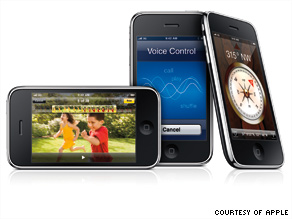
The phone's upgraded hardware, combined with a new operating system, will allow developers to design apps that wouldn't have worked on previous models of the iPhone.
For example, developers said, the iPhone 3GS is the first iPhone with a video camera, which could inspire apps that edit or mix video clips. Other developers are eyeing the new phone's built-in compass or its "push notification" feature, which pings users with messages even if its instant-message application is not open.
"Apple has given us all these new tools," said William Kasel, founder and CEO of Jumpfox, a San Francisco, California-based company that makes mobile apps. "And I can't wait to see what developers come out with in the next six months. The new features really take [the phone] to a whole new level."
Apple fans in the United States and seven other countries lined up Friday morning to be among the first to get their hands on the new iPhone 3GS, billed as the fastest, most feature-laden iPhone yet. iReport: Buying an iPhone 3GS?
Lines outside Apple's 211 retail stores in the United States were generally shorter than for last July's debut of the iPhone 3G, probably because owners of that phone balked at paying upgrade fees to wireless carrier AT&T or could simply update their devices by downloading the iPhone's new 3.0 operating system.
The buying process also seemed smoother than last summer's iPhone launch, which was marred by slow-moving lines and a flood of customers trying to activate their phones at once. According to reports on Twitter, many iPhone 3GS buyers were able to activate their phones faster and more smoothly than last year.
The new iPhone contains a processor that Apple claims is more than twice as fast as its 3G model, plus a video camera, voice control, longer battery life and a built-in compass. It comes with an upgraded operating system -- which Apple released Wednesday for download onto older iPhones -- with 100 new functions, including the ability to copy and paste text.
But the phone's biggest game-changer, observers say, may be new software that allows iPhone users to make purchases within applications.
On previous versions of the iPhone, applications linked users to Web sites where they could buy consumer goods or other items. With the new iPhone 3.0 operating system, users can shop entirely within apps designed specially for the phone, which promises to make for smoother transactions.
App developers love this new function. Until now, they earned money only when people bought applications through Apple's App Store, or from selling ads within the apps themselves. But now, for example, a game developer could charge users a few extra dollars to access higher levels of a video game. Other apps could allow users to locate the nearest movie theater, and then buy tickets.
"It's a whole new revenue stream," said Brian X. Chen, who writes about consumer technology for Wired.com. Chen believes the new feature could help iPhone app developers achieve long-term profits instead of hoping for an App Store "one-hit wonder" that sells well and then disappears.
"This could be absolutely huge for a lot of people," agreed MG Siegler, who writes for TechCrunch, a popular technology blog. "There's a lot of money to be made there, I think."
Siegler believes another bonus of the iPhone 3GS's new software is its ability to interact with special accessories via Bluetooth and the phone's dock connector. To cite one example that Apple showcased at a recent 3.0 event, a diabetes app could hook up with an insulin meter, allowing a diabetes patient to check his or her glucose levels.
Developers already are customizing apps for the new iPhone. Jumpfox is hoping to launch BuzzBuy, its PayPal-like e-commerce widget, as an iPhone 3GS app this summer. And ScrollMotion plans to introduce an upgraded version of its Iceberg reader, which will allow iPhone users to download more than 50 magazines, 170 newspapers and 1 million books to their devices for reading on the go.
"We love the new 3.0 functionality," said Josh Koppel, a ScrollMotion co-founder, who also believes the phone's copy-and-paste feature will help students and other readers get more use from the Iceberg app. "A new way to monetize on this magical device ... is the best thing we could have asked for."
The popular phone went on sale Friday in the U.S. and Canada plus six European countries: France, Germany, Italy, Spain, Switzerland and the United Kingdom.  Watch iPhone buyers lined up in London »
About 300 people stood outside the flagship Apple Store on New York's Fifth Avenue waiting for the doors to open Friday morning. In Atlanta, Georgia, more than 100 people were in line early Friday outside an Apple Store at Lenox Square mall.
"It doesn't seem like it's the Apple fanatics [this time]. It's moms and dads," said Robin Cutshaw, 51, who lined up for previous iPhone launches in 2007 and 2008.
An IT specialist, Cutshaw said he travels everywhere with his iPhone and once even used it to work remotely from a beach in Brazil. "It doesn't go in the shower with me, but that's about it," he said.
Some who had preordered phones were frustrated by how slowly their line moved outside the Atlanta store. But Marc Kagan, 31, said that buying his new phone took him about three hours, much less than the 10 hours it took last year.
Customers encountered problems activating their new phones last July because demand overwhelmed Apple's iTunes servers. But on Friday, Kagan said it took Apple employees about 15 minutes to activate his phone in the store.
"It went pretty smooth. I think they're a little more organized this year," he said.
AT&T stores, Best Buy and Wal-Mart also are selling the iPhone 3GS, although preorders through AT&T and Best Buy sold out before Friday.
(Entertainment Weekly) -- How are the elements of the charming, traditional romantic comedy "The Proposal" like the checklist of a charming, traditional bride? Let me count the ways ...
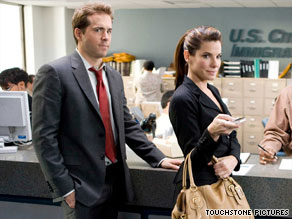
Ryan Reynolds wonders if marrying his boss, Sandra Bullock, is a good thing in "The Proposal."

Something old: The story of a haughty woman and an exasperated man who hate each other -- until they realize they love each other -- is proudly square, in the tradition of rom-coms from the 1940s and '50s. Or is it straight out of Shakespeare's 1590s?
Sandra Bullock is the shrew, Margaret, a pitiless, high-powered New York book editor first seen multitasking in the midst of her aerobic workout (thus you know she needs to get ... loved). Ryan Reynolds is Andrew, her put-upon foil of an executive assistant, a younger man who accepts abuse as a media-industry hazing ritual.
And there the two would remain, locked in mutual disdain, except for Margaret's fatal flaw -- she's Canadian. (So is "X-Men's" Wolverine; I thought our neighbors to the north were supposed to be nice.)
Margaret, with her visa expired, faces deportation and makes the snap executive decision to marry Andrew in a green-card wedding. It's an offer the underling can't refuse if he wants to keep his job. (A sexual-harassment lawsuit would ruin the movie's mood.)
OK, he says. But first comes a visit to the groom-to-be's family in Alaska. Amusing complications ensue.
Something new: The chemical energy between Bullock and Reynolds is fresh and irresistible. In her mid-40s, Bullock has finessed her dewy America's Sweetheart comedy skills to a mature, pearly texture; she's lovable both as an uptight careerist in a pencil skirt and stilettos, and as a lonely lady in a flapping plaid bathrobe.
Reynolds, meanwhile, is just refining his dry comedy thing, learning to get the most from his deceptive cute-face looks.
Who knew these two would, hmmm, complete each other? Working together, both are surer and more disciplined in delivering their comedy goods. iReport.com: "Proposal" has "plenty of laughs"
Something borrowed: The boisterous family dynamics. The eccentric supporting players (none more extreme than Oscar Nunez from "The Office"). The snappy screwball dialogue in Pete Chiarelli's script. And the way Anne Fletcher directs like a camp counselor wrangling bunkmates ... it's all been seen before. For a reason. These elements work.
Something blue: As the wise and saucy matriarch of the family, the divine 87-year-old Betty White has fun as one hot grandma -- and inspires her younger stars to say "I do," too.


